From tube design to bender-ready cuts — in your browser.
BendrStudio turns a chassis design into cut lengths, bend marks, and 1:1 notch templates. No thousand-dollar license, no software that looks like it shipped on a CD-ROM. I got tired of doing tube math by hand — so I built this.
Why this exists: I was building a chassis in my garage, re-deriving the same bend math in a notebook for the third time after a design change. The existing software looked — and cost — like it was 1995. So I made the tool I wanted. It's a beta, I improve it every week, and I actually want your feedback.
How it works

Design your tubes
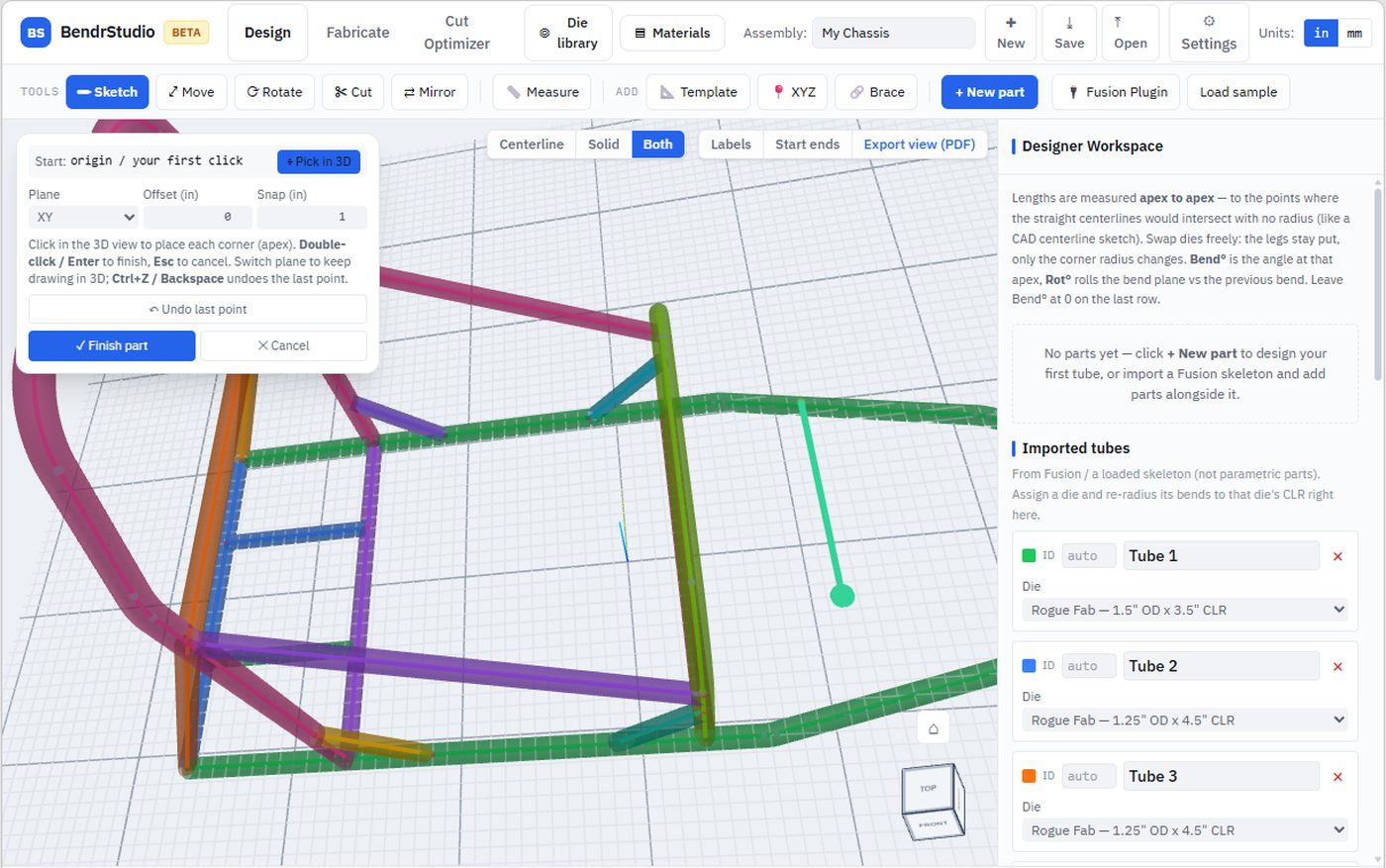
Sketch centerlines right in the app — or import from Fusion 360 with the free exporter script.

Pick your die
Choose from the die library or enter your own. Springback and clamp offset included.

Run the cut optimizer
See exactly how many sticks to buy and where every cut lands.

Print and bend
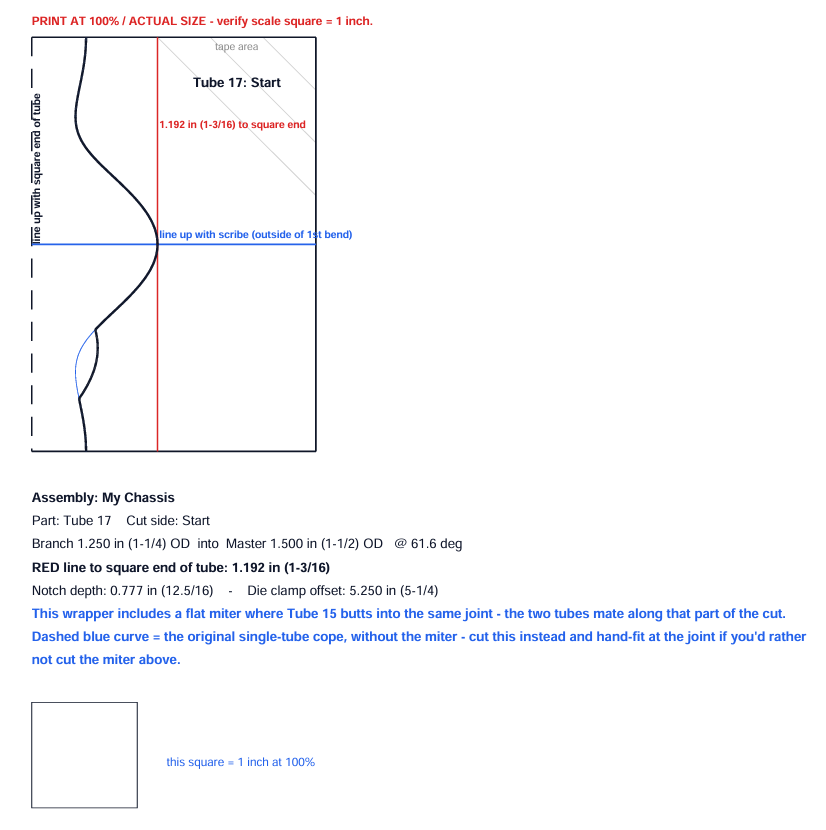
Bend cards per tube and 1:1 notch templates. Tape, trace, cut, bend.
Design right here, no CAD required
Fusion 360 import is great if you use it — but you don't need it. BendrStudio has its own set of design tools: sketch tube centerlines, move, rotate, mirror, add braces, all in the browser. And imported geometry stays fully editable, same as anything you draw here.
The CAD tools are already solid and they get better every release — this is the part of the app I'm most actively building.
Know exactly how many sticks to buy — before you drive to the steel yard
Feed it the stock lengths your supplier actually sells. The optimizer packs every cut in your project into the fewest sticks, shows you the drop from each one, and totals material and cost. No more guessing, no more third trip for one more stick.
- →Packs cuts into real stock lengths, minimizing waste
- →Shows drop per stick — keep the usable offcuts
- →Totals weight and cost for the whole build
The rest of the toolbox
Branch-to-branch miter cuts
Two braces landing on the same joint? It generates the real miter — something generic notch calculators simply don't do.
Imports stay fully editable
Move, rotate, cut, mirror, re-radius imported tubes like you drew them here — with a warning gate before anything destructive.
Fishmouth & cope templates
Auto notch templates at true 1:1 scale, verification square on every print.
Real die data
Rogue Fab, JD2, Pro-Tools, Swag Off Road and more — calibration, springback, clamp offsets.
Live recalculation
Change the design, every number and template updates instantly.
Full export set
PDF bend sheets, 1:1 templates, dimensioned views, HTML reports, STL notch-check fixtures.
What comes out the other end


It's a beta. Here's the deal.
This is a new app under active development — which means it moves fast, and you get a say in where it goes.
It gets better while you sleep
New features and fixes land constantly. The CAD tools especially — that's the current focus.
Bugs get squashed fast
One builder, no ticket queue, no "known issue since 2019." Report it and watch it disappear.
Feedback actually steers this
The next features come from what fabricators ask for. Tell me what's missing from your workflow.
Pricing
beta pricing — join now and it stays this price for you
Try it, small or one-off projects.
Individual builder, ongoing projects.
Small shop, multiple projects/seats.
FAQ
Yes — the math, templates, and exports are solid and in use on real projects. Beta means the app is young, moving fast, and occasionally rough around the edges. If you hit something weird, report it and it gets fixed quickly.
No. The app has its own design tools — sketch, move, rotate, mirror, brace — robust enough to build a full chassis from scratch. Fusion import is there if you already work in CAD.
You tell it what stock lengths your supplier sells; it packs every cut in the project into the fewest sticks, shows the drop per stick, and totals material and cost — before you buy anything.
No — it picks up where a Fusion tube-centerline sketch leaves off. You still design in Fusion (or use BendrStudio's own sketch tools for simple parts); BendrStudio turns that into cut/bend/notch data.
Rogue Fab, JD2, Pro-Tools, Swag Off Road, and more — plus custom die entry for anything not in the library.
Print at 100% scale on any standard printer. Every template includes a built-in scale-verification square so you can confirm it printed true before you cut.
Yes — fishmouth/cope generation for standard junctions, plus branch-to-branch miter cuts where two braces land on the same point.
PDF (bend sheet, cut wrapper, dimensioned views, HTML report), and an optional STL for 3D-printed notch-check fixtures.
Today, projects live in your browser's local storage — nothing is uploaded unless you export it. Account-based cloud sync is planned but not live yet.